Search the documentation
Enter at least 2 characters
Enter at least 2 characters
 |
CAE Fidesys 9.0 Documentation |
Here you can see:
Random vibration analysis in CAE Fidesys takes place in several stages, in addition to creating a model:
To conduct an analysis of the impact of random vibration, it is necessary to prepare a file in *.csv format with the spectral power density. The file should contain a table, where the first column contains the frequency values (Hz), and the subsequent ones - the acceleration squared, divided by Hz). It is necessary to specify the column names:
Example of setting the spectral power density along the Ox, Oy, Oz axes in the *.csv file:
| f | ax | ay | az |
|---|---|---|---|
| 1 | 5E-01 | 3E-01 | 6.5E-01 |
| 10 | 2.5 | 3.17 | 1.1 |
| 30 | 2.5 | 3.17 | 1.1 |
| 100 | 0.5 | 0.2 | 0.1 |
Note: Microsoft Excel can open a csv file in this format:
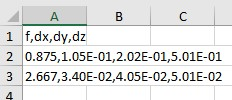
i.e. without dividing the file into columns and listing the file line values through a comma.
To divide the test in lines by the corresponding columns, you need to put a comma in the settings of the list element separators of your operating system.
It is worth noting that if the settings are not changed, the file will not be loaded correctly.
The response spectrum is attached to the model in the FidesysViewer program.
The algorithm for conducting modal analysis can be viewed in the tab Determining natural frequencies and vibration modes.
On the Command Bar, select Mode - Calculation Settings, Calculation Settings - Spectrum Analysis.
Among the spectral analysis settings, select the icon  (General).
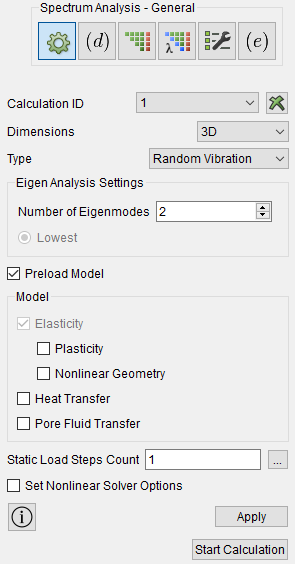
In the Dimensions drop-down list, select the dimension of the problem to be solved: 3D (three-dimensional; default) or 2D (flat).
In the Type group, specify the required type of spectral analysis (Response Spectrum or Random Vibration).
In the Settings group, specify the data required for the calculation: the number of natural frequencies to be determined.
In the case of analyzing vibrations of a pre-loaded structure, check the Preload model box, and in the Model group that opens, specify the features of such loading (Plasticity, Nonlinear geometry, Heat transfer, Pore Fluid Transfer).
Click Apply.
After completing the modal calculation, go to FidesysViewer using the key combination Сtrl+E.
In the main menu, go to the tab Filters - Alphabetical - Random Vibration.
The following settings are available in the appeared window of calculation results properties:
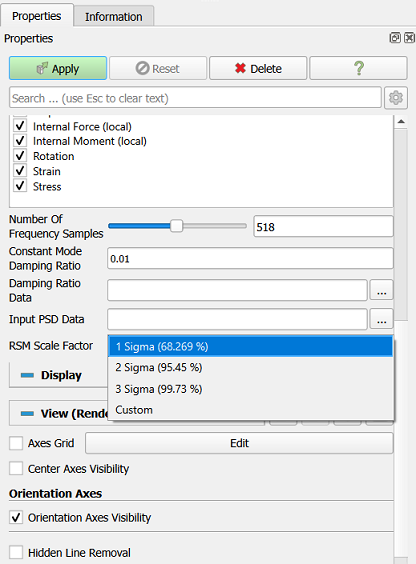
After setting all the settings, click Apply.
The file with loads is a table.