Search the documentation
Enter at least 2 characters
Enter at least 2 characters
 |
CAE Fidesys 9.0 Documentation |
Suppose that we want to set the same element type (in particular, the same material) for the entire mesh model and a single type of boundary condition on all surfaces. This is done by defining a block of elements and a sideset of nodes respectively; identification (ID) numbers of such objects are assigned by the user, based on some views that are important for analysis. The block of elements and the set of nodes are defined using the Command Panel. To combine similar elements of the generated grid into a block and assign it an ID, do the following (the actions are illustrated by the corresponding view of the Command Panel below, Fig. 20):
Select Mode - Blocks, Entity - Block, Action - Add.
Enter Block ID: 1.
Select Volume from the drop-down list.
Enter entity ID 1 by selecting it in the graphical window or directly specify the value 1 in the ID input window.
Click Apply.
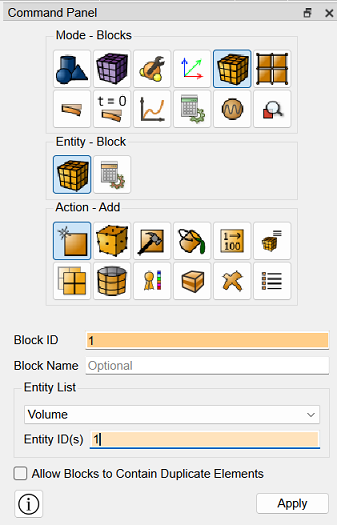
Fig.20 - View of the Toolbar
To create a node set (with the same boundary conditions), do the following (they are visible on the Command Bar, Fig. 21):
Select Mode - Sets, Entity - Nodeset, Action - Create nodeset.
Enter Nodeset ID: 1.
Among the radio buttons, find the Surface button and "turn it on".
Enter all in the ID(s) box to specify all surfaces.
Click Apply.
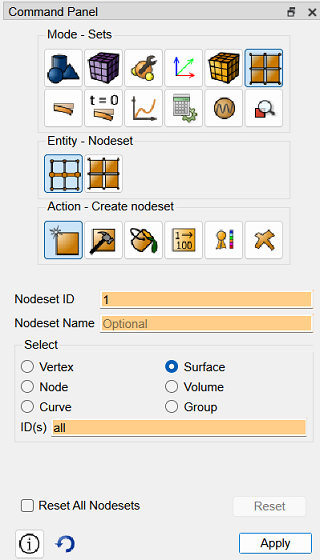
Fig.21 - Toolbar View

