Search the documentation
Enter at least 2 characters
Enter at least 2 characters
 |
CAE Fidesys 9.0 Documentation |
Projection is the operation of obtaining the projection of a curve belonging to one surface on another surface that is superimposed on the first. Merging is the operation of combining two overlapping surfaces into one surface belonging to two volumes, creating a uniform geometric entity (multi-dimensional topology). Projection and Merge are necessary for constructing a comfortable mesh on adjacent volumes. As a rule, these operations are required after making cuts.
To project and merge surfaces along which two volumes are adjacent, select on the Command Bar Mode - Geometry, Entity - Volume, Action - Imprint and Merge.
In the Volume ID input window, specify all.
Click Apply:
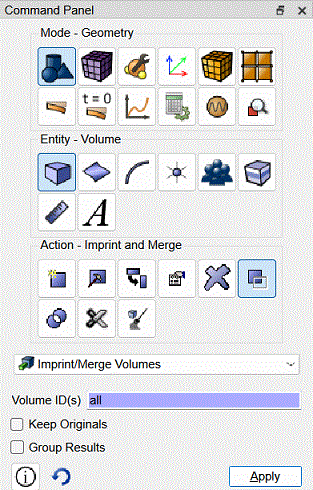
Fig. 33 - Command bar, mode for projecting and merging entity.
After performing the operations Projection and Merge you will not notice any visible changes in the image of the geometric model in the graphics window, but the results of these operations are displayed in the command line window. You can verify this by viewing the output data.
Returning to the Power Tools, you can see that Overlapping Surfaces has disappeared from the list of existing problems.
Click the Analyze button on this panel.
A message appears in the list of existing problems that nothing was found.

