Search the documentation
Enter at least 2 characters
Enter at least 2 characters
 |
CAE Fidesys 9.0 Documentation |
The finite element meshing wizards provide a simple graphical way to determine whether volumes are suitable for meshing. For suitable volumes, there are options to select a meshing scheme from a number of available ones. If a volume is initially unsuitable for partitioning, it is marked and highlighted in color. Let's try to determine whether the volume in question is suitable for partitioning.
On the Power Tools, click on the Diagnose Meshability icon (located to the right of the Diagnose Geometry icon).
The drop-down list specifies Volume by default.
In the input window to the right of this list, specify all.
Click Analyze:
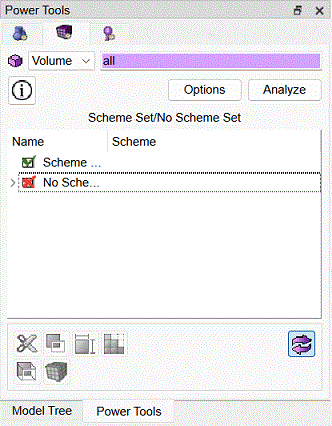
Fig. 13 - Power Tools for checking the suitability of volumes for mesh construction.
The Scheme Set/No Scheme Set list below, and also the command line window, warns that a mesh construction scheme must be specified for Volume 1, since it cannot be automatically split.
Right-click on this volume in the list, and on the additional panel that appears, select the Draw option.
The image in the graphic window takes the form shown in Fig. 14, where volume 1 is highlighted in red. When using the described power tools, all volumes to be split are highlighted in green and those not suitable for splitting are highlighted in red.
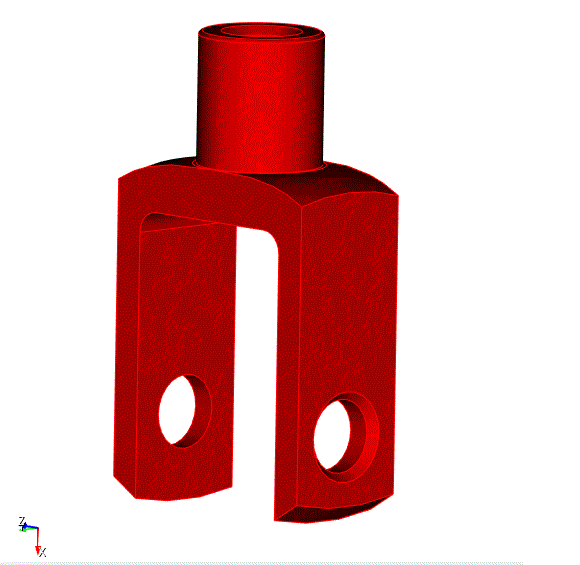
Fig. 14 - Geometric model, volumes unsuitable for partitioning are highlighted in red.

