Search the documentation
Enter at least 2 characters
Enter at least 2 characters
 |
CAE Fidesys 9.0 Documentation |
Now you can create a volumetric mesh. Again, the first step is to set the meshing scheme, and the second step is to give the command to build the mesh. In certain cases, Fidesys can set the mesh scheme automatically. For volumes suitable for sweeping using the Sweep scheme, the automatic scheme selection algorithm automatically identifies the start and end surfaces of the sweep.
To automatically determine the sweep scheme in our example, as well as the start and end surfaces, do the following:
On the Command Bar in Mesh mode, select Entity - Volume and Action - Mesh:
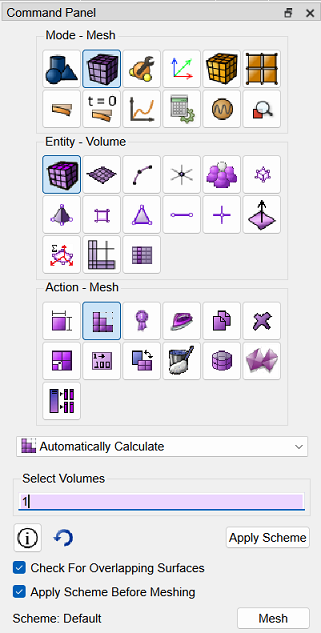
Fig.15 - View of the command bar
Place the cursor in the Select Volumes input box, then select the volume in the graphics window. The input box will display ID: 1. In the Select mesh construction scheme drop-down list, find Automatically Calculate.
Click Apply Scheme. Then click Mesh.
The final appearance of the entity, broken down into elements, appears in the graphic window, as shown in Fig. 16 (image with soft shadows):
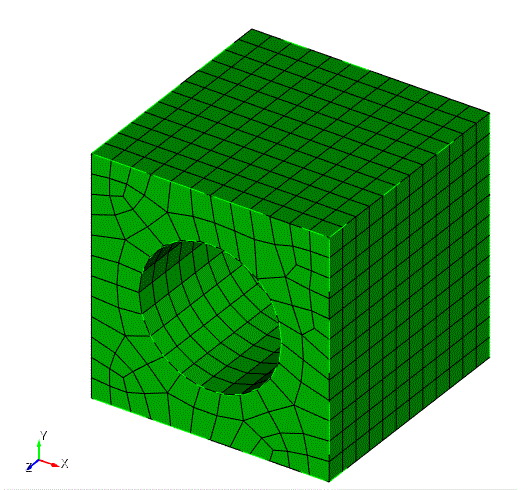
Fig.16 - Result of step 8

