Search the documentation
Enter at least 2 characters
Enter at least 2 characters
 |
CAE Fidesys 9.0 Documentation |
This example illustrates additional possibilities for making cuts. The model shown in Fig. 1 would be suitable for sweeping by the many sources - one target type if it did not have an overhanging upper edge and projections on the lower surface. It seems obvious to use the bottom surface as a cutting plane. However, this will not create a volume suitable for sweeping in this manner. Instead, you need to use the protruding surfaces as cutting planes, extending them through the entire volume of the model.
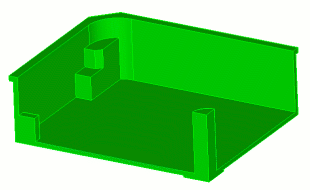
Fig. 1 - Geometric model
Table 1. - Types of sections for creating geometry suitable for constructing a mesh using the drag-and-drop scheme
Section view |
Commands |
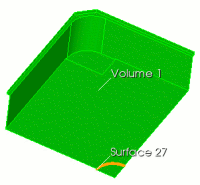 |
FIDESYS> webcut volume 1 with sheet extended from surface 27 |
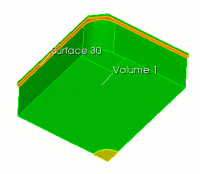 |
FIDESYS> webcut volume 1 with plane surface 30 |
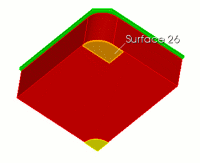 |
FIDESYS> webcut vol all sweep surf 26 vector -1 0 0 through_all Now volume 3 (Volume 3, highlighted in red) has only one end plane. FIDESYS> imprint
all |
For all volumes, a mesh with an element size of 0.05 was constructed, Fig. 2:
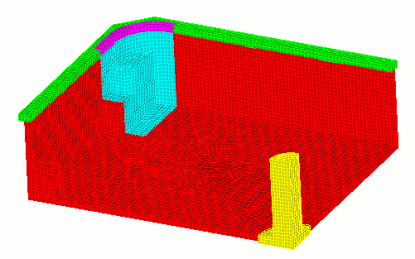
Fig. 2 - View of the constructed mesh