Search the documentation
Enter at least 2 characters
Enter at least 2 characters
 |
CAE Fidesys 9.0 Documentation |
The user can set distributed forces acting on entity of dimension 1D and 2D. It is possible both to create new distributed forces and to change previously created ones. To do this, you need to do the following:
On the Command Bar, select Mode - Boundary Conditions.
Select Entity - Distributed force.
Depending on the situation, choose Action - Create or Action - Modify.
Using graphical user interface elements set the identifier (ID) or name of a set of boundary conditions, specify entity to which force is applied, and its direction, as well as enter the amount of force.
Click Apply.
The corresponding commands entered in the command prompt window look like this:
[create] distributed force [name <name>] [<id>]
[{add|on} {curve|edge|face|sideset|surface|tri} {[[id] {[<id>] [<id range start> to <id range finish>]}...] [all]}]
{(vector [{[val1] <val>|formula1 <formula id>|table1 <table id>}]
[{[val2] <val>|formula2 <formula id>|table2 <table id>}]
[{[val3] <val>|formula3 <formula id>|table3 <table id>}]
[{[val4] <val>|formula4 <formula id>|table4 <table id>}]
[{[val5] <val>|formula5 <formula id>|table5 <table id>}]
[{[val6] <val>|formula6 <formula id>|table6 <table id>}])|(force {val <val>} moment {val <val>} [direction {Setting the direction}])}
[{specific|equivalent}]
modify distributed force {[[id] {[<id>] [<id range start> to <id range finish>]}...] [<name>] [all]}
[{add|remove} {curve|edge|face|sideset|surface|tri} {[[id] {[<id>] [<id range start> to <id range finish>]}...] [all]}]
[name <name>]
[{(vector [{[val1] <val>|formula1 <formula id>|table1 <table id>}]
[{[val2] <val>|formula2 <formula id>|table2 <table id>}]
[{[val3] <val>|formula3 <formula id>|table3 <table id>}]
[{[val4] <val>|formula4 <formula id>|table4 <table id>}]
[{[val5] <val>|formula5 <formula id>|table5 <table id>}]
[{[val6] <val>|formula6 <formula id>|table6 <table id>}])|(force {val <val>} moment {val <val>} [direction {Setting the direction}])}]
[{specific|equivalent}] [cs {<ID>|<name>}]
[step {[[id] {[<id>] [<id range start> to <id range finish>]}...] [all]}]
The direction of force can be specified in the ways described in the subsection Setting the direction. Using the keywords force and moment allows you to define the components of force and moment separately. If the keyword vector is used, then the first three values entered are components of the distributed force, and the last three are components of the distributed moment. If force and moment are created at the same time, their guiding vector is the same, then the direction can be set once. In the case when the guiding vectors are different, you should first create one load element, for example, force, and then add another element - moment.
Distributed Force – (specific) load distributed per unit length/area.
Equivalent Force – (total) load distributed over the nodes of the grid, integrally summing which, the entered number is obtained.
Tracking Load – a load that "tracking geometry changes". When the check mark is turned on, the load remains at the angle to the curve/surface at which it was set. This option makes sense when the Nonlinear geometry is enabled in the task.
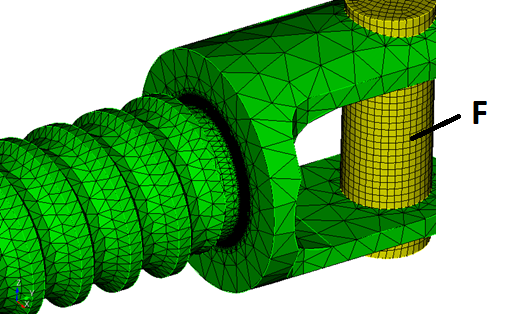
Go to the Command Bar - Boundary Conditions, Entity -Distributed force, Action— Create.
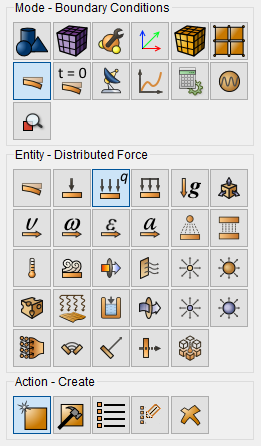
Set the following parameters:
Entity List: Surface;
Entity ID(s): 103 107;
Force: {14900/351.475};
Direction Vector: (0 1 0) (positive direction of y axis).
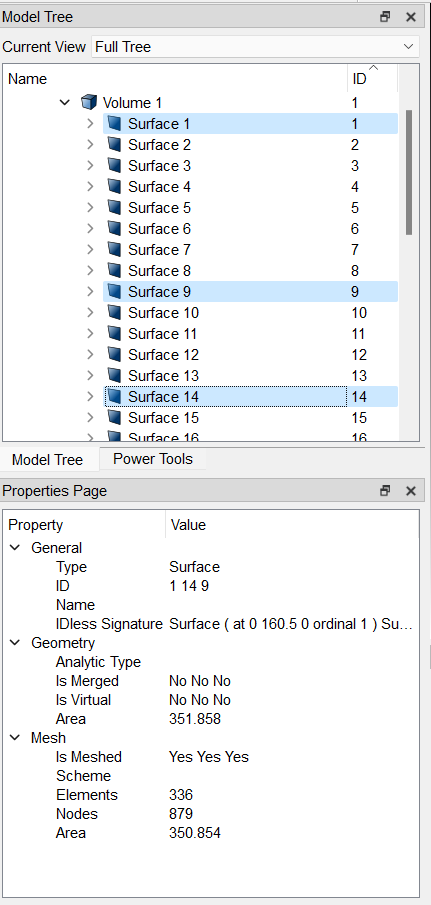
The expression in parentheses {} means using the built-in Aprepro language. To set the force distributed over the surface in the CAE Fidesys package, it is necessary the force value is divided by the surface area. The surface area can be found in the Tree on the left. To do this, select two surfaces in the Tree with the mouse. Their area of 350.854 will appear on the Properties page.
Important: when setting the force on the edge of the shell, the force is distributed over the entire side surface, taking into account the thickness of the shell.
Step -by-step example with a task with a force distributed over a surface