Search the documentation
Enter at least 2 characters
Enter at least 2 characters
 |
CAE Fidesys 9.0 Documentation |
Gravity can be set as for the whole model (globally), so it is for individual geometric (volume, surface, curve, vertex) and finite element (node, set of nodes) entity.
The creation or modification of such boundary conditions is carried out as follows:
On the Command Bar, select Mode - Boundary Conditions.
Select Entity - Gravity.
Using graphical user interface elements specify the identifier (ID) or the name of the set of boundary conditions, specify entity that are subject to restrictions, determine the degrees freedoms and the magnitude of restrictions.
Click Apply.
The boundary condition is "Gravity" can be applied to all types of geometric entity. Units of measurement m/s2.
The result of applying gravity to an entity is a volumetric force acting to this entity. If the value of gravity is constant, the results do not depend on time. This is the difference between this GU and acceleration, which is used for time analysis tasks and the result of the action which are time-dependent displacements.
The corresponding commands entered in the command prompt window, have the form:
[[create] gravity [name <name>] [<id>]
[{global|{add|on} {curve|node|nodeset|surface|vertex|volume} {[[id] {[<id>] [<id range start> to <id range finish>]}...] [all]}}]
modify gravity {[[id] {[<id>] [<id range start> to <id range finish>]}...] [<name>] [all]} [{global|{add|remove} {curve|node|nodeset|surface|vertex|volume} {[[id] {[<id>] [<id range start> to <id range finish>]}...] [all]}}]
[name <name>]
[dof <num> {value <value>|formula <formula id>|table <table id>|remove}]
[cs {<ID>|<name>}]
[step {[[id] {[<id>] [<id range start> to <id range finish>]}...] [all]}]
The dom command determines the direction of the vector g. The values 1, 2 and 3 correspond to the directions of the X, Y and Z axes, respectively , of the coordinate system specified by the cs command. If the coordinate system is not set, the directions of the axes of the global coordinate system will be used.
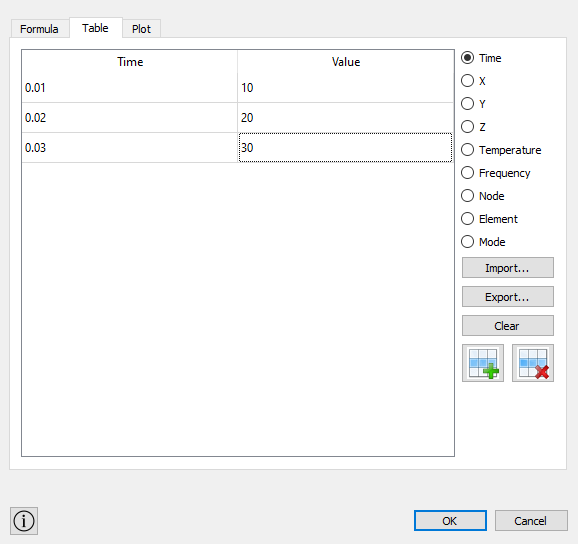
For gravity , it is possible to attach a tabular dependency , including and from the frequency to build the accelerogram. To do this, on the command panel , when setting gravity, you need to put a check mark in the appropriate field Direction and, then, click on the “three dots” icon. Opens Table Editing window: