Search the documentation
Enter at least 2 characters
Enter at least 2 characters
 |
CAE Fidesys 9.0 Documentation |
The Property Page is a window that lists properties about the current entity selection. Some of the properties, like CAE Fidesys ID, entity type, or geometry engine, are listed for reference only. Other attributes, like name, or mesh intervals, color, mesh scheme, or smooth scheme can be edited from the window. The Property Page is located on the left panel in the GUI. The highlighted entity/entities in the graphics window are listed in the property page window. The Property Page also lists information about selected mesh entities, boundary conditions, and assemblies. Selecting an object from the Tree View will also open the object in the property page.
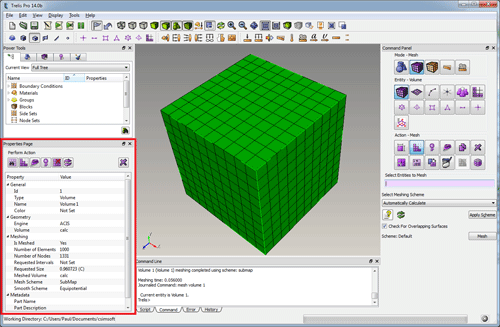
Figure 1. Property Page Window
The row of buttons on the top of the editor are shortcuts to common commands. These include:
> |
Meshes the selected entity/entities at their current interval and scheme settings |
 |
Smooth selected entity using the current smoothing scheme |
 |
Preview mesh intervals on selected entity |
 |
Delete mesh on specified entity (do not propagate to lower order entities) |
 |
Reset entity to default settings and delete mesh |
 |
Calculates volumes and surface areas |
 |
Delete current entity |
The Property Page provides a convenient way to change attributes on entities. . Some of the fields cannot be changed, some can be edited from an input field, and others are edited by selecting from a list, or by opening the corresponding window from the Control Panel.
If multiple entities are selected, the attributes that are similar to both entities will be shown. Changing an attribute from the property page will change that attribute on both entities. If multiple entities are selected the total volume, surface area, and length of all entities will be shown.
Below is a summary of properties listed for each attribute type.
The part name, description and material description are available when the associated volume is selected, and not just when the part is selected.