Search the documentation
Enter at least 2 characters
Enter at least 2 characters
 |
CAE Fidesys 9.0 Documentation |
Radiation can be applied to an object of 1D and 2D dimensions.
To create or change the boundary conditions of radiation, you should:
On the Command Bar, select Mode - Boundary Conditions, Entity - Radiation.
Depending on the situation, select Action - Create or Action - Change.
Set the identifier (ID) or name of the set of boundary conditions, specify the objects to which the radiation is applied, and enter its density.
Click Apply.

The relevant commands are listed below:
create radiation [ID] [name <'name'>] [{add | on} {sideset | surface | curve | face | tri | edge | vertex | node | nodeset} <entity_list>] [value <value>]
modify radiation {ID_list | 'name' | all} [name <'name'>] [{add | remove} {sideset | surface | curve | face | tri | edge | vertex | node | nodeset} <entity_list>] [value <value>]
For example, to set radiation on surface 6 with temperature values of 20 degrees and emissivity of 0.5 can be specified on the command line:
create radiation on surface 6 surrounding value 20 emissivity value 0.5
When specifying the radiation, you must specify the Temperature and Emissivity (optional). Setting the emissivity via the load has higher priority than via material properties.
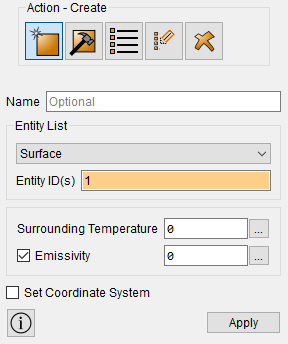
Temperature: to set the temperature of the environment, intended entity, keyword environment, followed by an appropriate value.
Emissivity: Heat transfer coefficient is specified using the keyword emissivity and a certain value (in the range [0; 1]).
Radiation can be applied to:
surfaces;
triangles;
quadrilateral faces of elements;
curves;
edges;
vertex;
node;
node set;
sets of sides.
To configure the radiation exchange between surfaces you should select:
Calculation Settings - Static/Transient Analysis;
Model - Heat transfer and select Radiation exchange between surfaces:
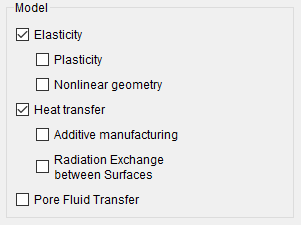
Radiation exchange between surfaces occurs according to the following rules:
heat exchange occurs only between those surfaces on which the load is applied Radiation;
if surfaces with a given load Radiation "do not face each other" then radiant heat exchange between the surfaces does not occur;
if surfaces with a given load of radiation "partially face each other" then some of these surfaces interact with the environment.
Set of two cubes (1 m side) made of carbon steel. Added to the properties of carbon steel is an emissivity of 0.8 and a Stefan-Boltzmann coefficient of 5.67e-08. A load in the form of a Volume Heat Source of density 1000 is applied to one cube. A load of Radiation (temperature 0) is applied to the sides of the cube facing each other.
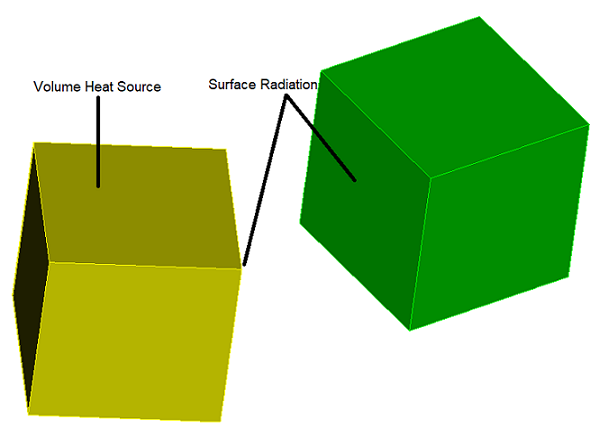
Thermal fields through 10 substeps of steady-state calculation:
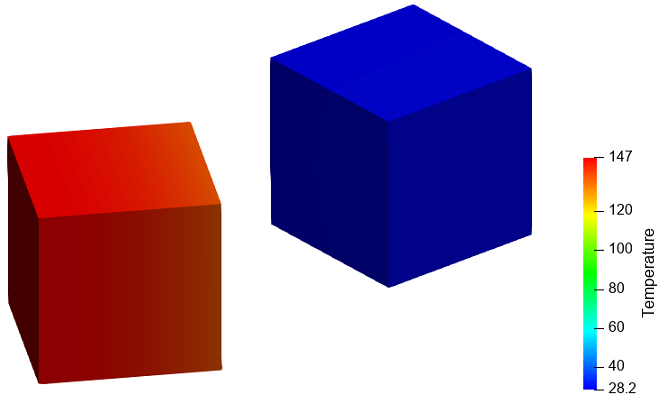
Step-by-step example with radiation exchange between surfaces