Search the documentation
Enter at least 2 characters
Enter at least 2 characters
 |
CAE Fidesys 9.0 Documentation |
Anisotropy is a physical phenomenon in which the physical properties of a body differ in different directions.
In modern designs, along with materials that are usually taken as homogeneous and isotropic in calculations, anisotropic materials are also used to manufacture parts, which have a sharp difference in elastic properties for different directions.
In the case of linear elasticity, the number of constants for determining
an isotropic material is 2, and for an anisotropic material, from 3 to
21 in the general case. For an anisotropic material, the linear relationship
between the stress tensor  and the strain tensor
 is written in the form of the generalized Hook law:

Or

where  is the fourth-rank elasticity tensor, symmetric
with respect to pairs of indices
is the fourth-rank elasticity tensor, symmetric
with respect to pairs of indices

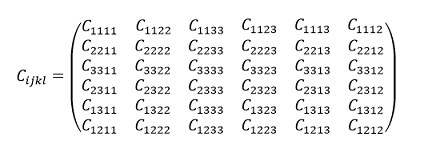
Or, since the tensor is symmetric with respect to pairs of indices:
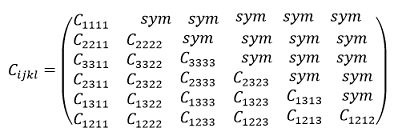
Or:
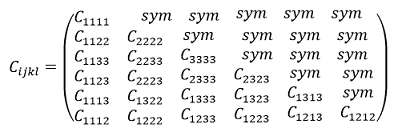
Also, to write the elasticity tensor C, one can use Voigt notation — a matrix form for writing a symmetric 4th-rank tensor.
If a 4th-rank tensor has symmetry in the first and second pairs of indices, then its elements can be written as a 6x6 matrix using the following substitution of indices:
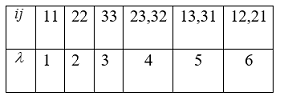
Table.1
Then the elasticity tensor can be written
as follows:
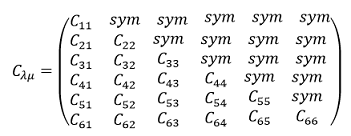
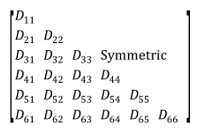
This notation is used in the finite element analysis software Ansys:
The full 6x6 elastic coefficient matrix [D] relates the terms ordered by x, y, z, xy, yz, xz through 21 constants as shown below.
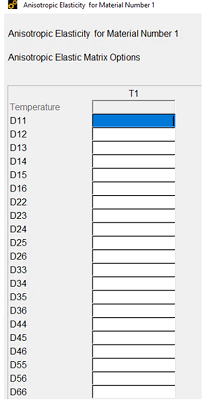
Specifying an anisotropic material in Ansys APDL using constants Dij looks like this: (Main Menu – Preprocessor – Material Models – Structural – Linear – Elastic – Anisotropic):
Thus, an anisotropic material is characterized by an elasticity tensor (elasticity matrix) of the fourth rank, which is symmetrical in pairs of indices.
To create an anisotropic material in CAE Fidesys, you need to set the elasticity matrix constants Cijkl (C1111- C3333, they are the same as Dij in Ansys).
To create a new material, select the module for setting the material properties on the command panel (Mode – Material, Entity– Material Management):
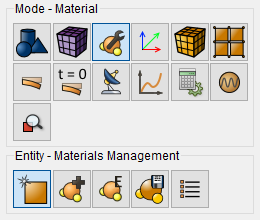
The properties of the material, including anisotropic ones, are set in the widget Material management:
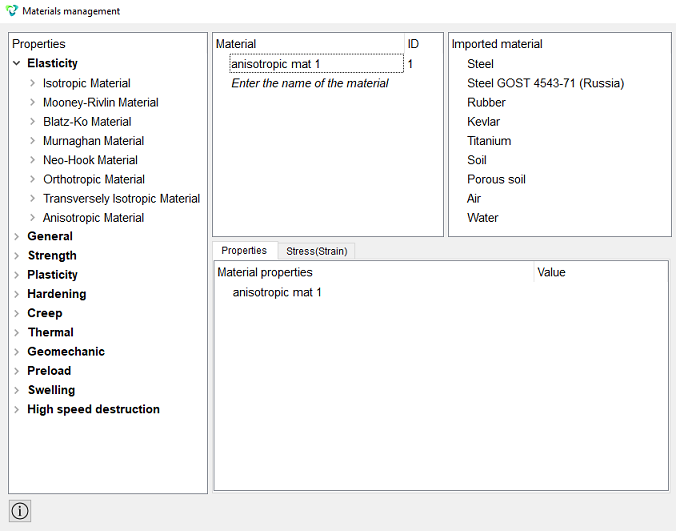
Select Anisotropic Material. Now you can add the elasticity matrix constants Cijkl:
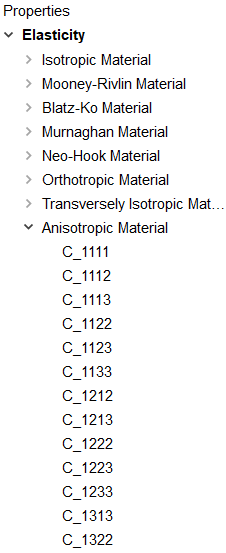
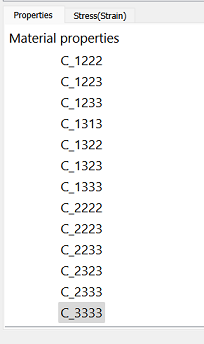
Using the “drag&drop” technology, add the necessary constants Cijkl from the left column to the Material Properties column. Unspecified constants remain zero by default.
Select the desired constant with the mouse. Holding down the left mouse button, drag the inscription to Material Properties. Double-click in the Value field opposite the property that appears and specify the correct value.
Click Apply.
If successfully added, the created anisotropic material should appear in the Model Tree in the Materials section:
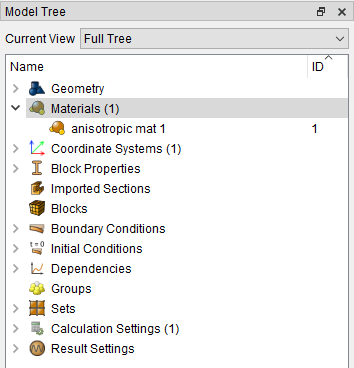
Important: in order to link a material and a model, a Block is used.
Adding a material to an existing block (assigning them to a specific block of elements) is done by entering the commands:

or set manually on the panel (Mode - Blocks, Entity - Block, Action - Block properties/parameters).