Search the documentation
Enter at least 2 characters
Enter at least 2 characters
 |
CAE Fidesys 9.0 Documentation |
To perform complex and resource-intensive engineering calculations, CAE Fidesys 9.0 version implemented automation of launching a series of several tasks, efficient allocation of computing resources (processor, RAM) and their queue management.
Uploading input data as separate files in *.fds and *.py formats, as well as folders (only *.fds).
Configuring the resources of the processor (CPU) and RAM (RAM).
Setting up simultaneous start-up for calculation: from 1 to 5 models.
Deleting files with the right mouse button. The operation is not possible at the moment when the calculation is not completed.
Adding files (format *.fds, *.py) to the queue.
Move tasks in the queue with the left mouse button. The operation is not possible at the moment when the calculation is not completed.
Complete stop of the entire queue during the calculation.
Tracking the status of the calculation: "Calculation in progress", "Open Results", "Unsuccessful Calculation", "Stopped".
Viewing the results: "Open Results" in FidesysViewer, right-click "View Solution Progress".
View execution statistics for each model in the queue: "Start Time", "End Time", "Duration".
View general execution statistics: "Calculation Series Start", "Completed", "Duration", timeline progress.
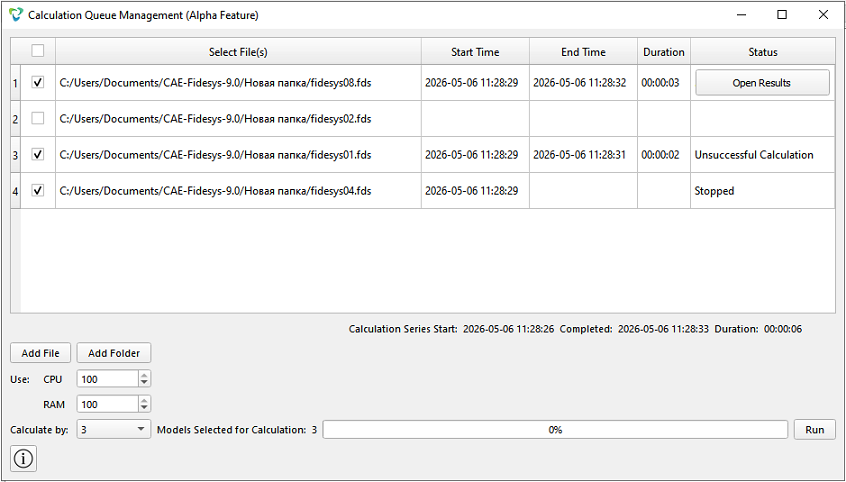
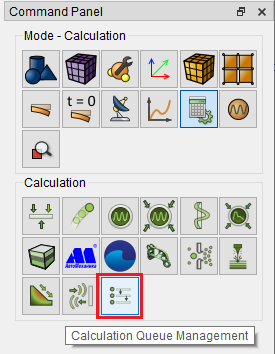
Calculation queue management is opened manually via the "Command Panel" in the menu "Calculation – Calculation Queue Management".
The algorithm of operation Calculation Queue Management