Search the documentation
Enter at least 2 characters
Enter at least 2 characters
 |
CAE Fidesys 9.0 Documentation |
Clip is used to clip any dataset using either an implicit function (such as a plane, sphere, or a box) or using values of a scalar data array in the input dataset. A scalar array is a point or cell attribute array with a single component. Clipping involves iterating over all cells in the input dataset and then removing those cells that are considered outside of the space defined by the implicit function or that have an attribute values less than the selected value. For cells that straddle the clipping surface, these are clipped to pass through the part of the cell that is truly inside the specified implicit function (or greater than the scalar value).
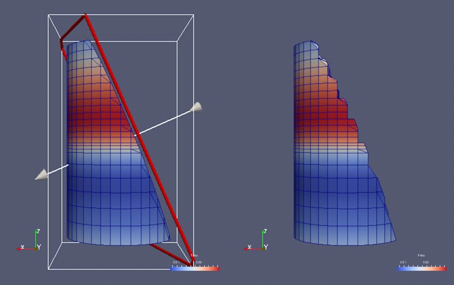
Figure 1 Comparison between results produced by the Clip filter with Crinkle Clip unchecked (left) and checked (right) when clipping with an implicit plane.
The image on the left also shows the 3D widget used to interactivly place the implicit plane for the clipping operation.
To create the Clip filter, you can use the Filters Common or
the Filters Common menu. This filter is also accessible from the
Common filters toolbar. You can click the  button
to create this filter.
button
to create this filter.

Figure 2 The Common filters toolbar in paraview for quick access to the commonly used filters.
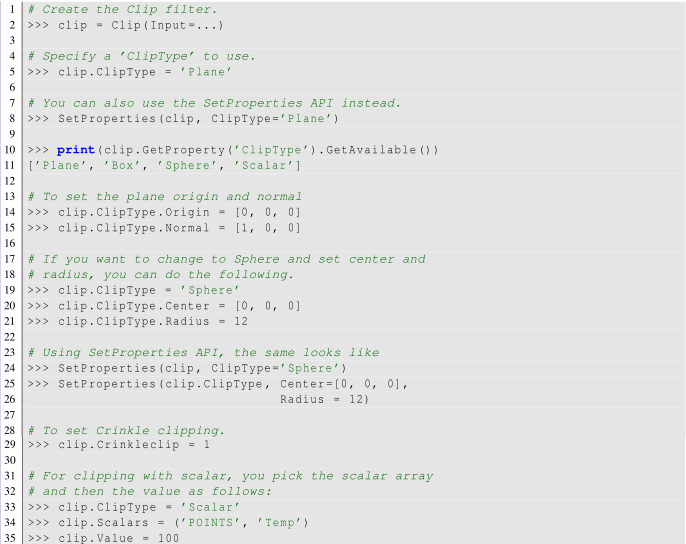
On the Properties panel, you will see the available properties for this filter. One of the first things that you should select is the Clip Type. Clip Type is used to specify the type of implicit function to use for the clipping operations. The available options include Plane, Box, Sphere, and Scalar. Selecting any one of these options will update the panel to show properties that are used to define the implicit function, e.g., the Origin and the Normal for the Plane or the Center and the Radius for the Sphere. If you select Scalar, the panel will let you pick the data array and the value with which to clip. Remember, cells with the data value greater than or equal to the selected value are considered in and are passed through the filter.
When clipping with implicit functions, FidesysViewer renders widgets in the active view that you can use to interactively control the implicit function, called 3D widgets. As you interact with the 3D widget, the panel will update to reflect the current values. The 3D widget is considered as an aid and not as a part of the actual visualization scene. Thus, if you change the active source and the Properties panel navigates away from this filter, the 3D widget will automatically be hidden.
Check Crinkle Clip if you don’t want this filter to truly clip cells on the boundary, but want to preserve the input cell structure and to pass the entire cell on through the boundary (Figure 1). This option is not available when clipping by Scalar.
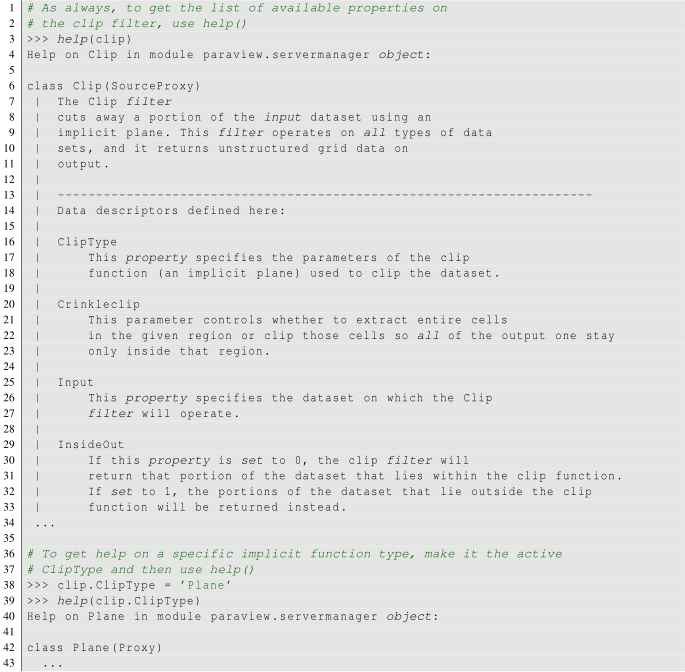
This following script demonstrates various aspects of using the Clip filter in pvpython.
It is very easy to forget that clipping a structured dataset such as image data can dramtically increase the memory requirements, since this filter will convert the structured dataset into an unstructured grid due to the nature of the clipping operation itself. For structured dataset, think about using Slice or Extract Subset filters instead, whenever appropriate. Those are not entirely identical operations, but they are often sufficient.