Search the documentation
Enter at least 2 characters
Enter at least 2 characters
 |
CAE Fidesys 9.0 Documentation |
CAE Fidesys includes the following types of analysis:
Static;
Dynamic (transient);
Modal;
Frequency Analysis (Harmonic);
Buckling;
Composite materials effective properties calculation;
Calculation Automechanics;
Topological Optimization.
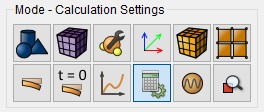
When starting calculation follow these steps:
1. Select Mode - Calculation Settings on Command Panel.
2. Select the necessary type of analysis: Static, Dynamic, Modal, or Effective properties analysis.
3. Set the parameters of the type of analysis you chose: solver type, coordinate system, fields, scheme, time settings (for dynamic analysis), etc.
4. Click Apply.
5. Click Start Calculation.
In a pop-up window select a folder to save the result and enter the file name.
In the case of a successful calculation, the console displays the message: Calculation finished successfully at "date" "time".
All the calculations are made in Cartesian coordinate system by default. If necessary, you can also convert the results into cylindrical and spherical coordinate systems (use the appropriate filters in FidesysViewer).
The dimension of the calculated problem is 2D or 3D. The following types of 2D problem are included:
Plane Stress;
Plane Strain.
Stress, strain and displacement fields are calculated by default. If necessary, you can also calculate principal stresses, strains, and Mises stress intensity (use the appropriate filters in FidesysViewer).
The following types of solvers of linear systems (systems of linear algebraic equations (SLAE)) appearing while discretizing the problem, are available:
Direct (LU);
Iterative.
The following solvers for problems of modal analysis at systems of linear algebraic equations (SLAE) are available:
Krylov- Schur;
Arnoldi.
For dynamic load, one of the two calculation schemes can be used:
Explicit;
Implicit.
The following mechanical models are supported:
Elasticity;
Plasticity;
Nonlinear geometry;
Heat transfer;
Pore Fluid Transfer.
To choose a model, the user selects the appropriate checkboxes. Selecting multiple checkboxes simultaneously allows setting various combinations of models. For example, the selection of the checkboxes Elasticity and Plasticity gives an elastoplastic model and the selection of the checkboxes Elasticity and Thermal conductivity gives a model of thermoelasticity.
To improve the convergence of nonlinear problems, use the following settings:
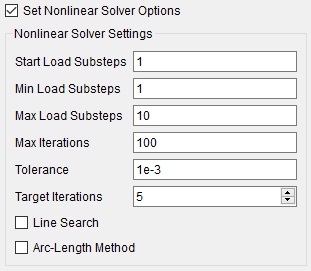
For nonlinear problems, convergence of iterations at each loading step can be checked in the file Convergence.txt. The file is downloaded into the folder that is created next to the file * .pvd which stores the calculation.
For effective performance of several calculations you can use the Results on Command Panel (see the section Result Analysis).
For visualization and analysis of the obtained results you can use the program FidesysViewer included into the package.