Search the documentation
Enter at least 2 characters
Enter at least 2 characters
 |
CAE Fidesys 9.0 Documentation |
The Slice filter slices through the input dataset with an implicit function such as a plane, a sphere, or a box. Since this filter returns data elements along the implicit function boundary, this is a dimensionality reducing filter (except when crinkle slicing is enabled), i.e., if the input dataset has 3D elements like tetrahedrons or hexahedrons, the output will have 2D elements, line triangles, and quads, if any. While slicing through a dataset with 2D elements, the result will be lines.The properties available on this filter, as well as the way of setting this filter up, is very similar to the Clip filter with a few notable differences. What remains similar is the set up of the implicit function – you have similar choices: Plane, Box, Sphere, and Cylinder, as well as the option to toggle Crinkle slice (i.e., to avoid cutting through cells, pass complete cells from the input dataset that intersects the implicit function). What is different includes the lack of slicing by Scalar (for that, you can use the Contour filter) and a new option, Triangulate the slice. Figure 1 shows the difference in the generated meshes when various slice properties are changed. The Slice filter is more versatile than the Slice representation.
First, the Slice representation is available for image datasets only, whereas the Slice filter can be used on any type of 3D dataset.
Second, the representation extracts a subset of the image consisting of a 2D slice oriented in the XY, YZ, or XZ planes at the image voxel locations while the plane used by the filter can be placed arbitrarily.
Third, since the Slice representation always shows a flat object and lighting may interfere with interpretation of data values on the slice, lighting is not applied to the Slice representation. Lighting is applied, however, to results from the Slice filter.
Lastly, the Slice representation may be faster than the filter to update and scrub through different slices because it does not need to compute the intersection of a plane with cells in the dataset.
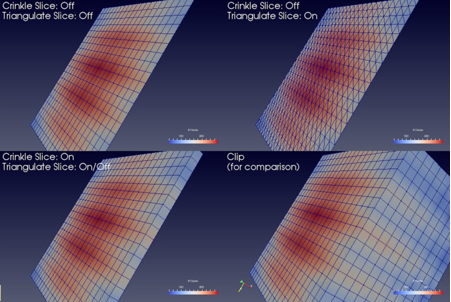
Figure 1 Comparison between results produced by the Slice filter when slicing image data with an implicit plane with different options.
The lower-left image shows the output produced by the Clip filter when clipping with the same implicit function, for contrast.
To create the Slice filter, you can use the Filters Common
or the Filters Common menu. This filter is also accessible from
the Common filters toolbar. You can click the  button to create this filter.

Figure 2 The Common filters toolbar in paraview for quick access to the commonly used filters.