Search the documentation
Enter at least 2 characters
Enter at least 2 characters
 |
CAE Fidesys 9.0 Documentation |
CAE Fidesys comprises three main components:
Fidesys — preprocessing and analysis (computational kernels);
FidesysCalc — calculations;
FidesysViewer — postprocessing and visualization of results.
You can run the program in either of the following ways:
Use the Start menu (if you chose creating shortcuts in it when installing): choose Fidesys in the folder where you installed the program.
Use any file manager for Windows from the list where the program was installed (C:\Program Files\Fidesys\Fidesys-9.0 by default): run the file fidesys.exe (it is in the folder preprocessor\bin).
Several copies of the program can be run on the same PC at a time.
If you work on the licensed version, after running the program you see its Main window. If you use the trial period, a Fidesys Licensing window appears in which you should either click Activate in order to purchase a license or click Try to continue working in trial mode and go to the Main window.
CAE Fidesys has an intuitive graphic interface providing communication between the user and the software, and it allows the user to perform the full cycle of calculations step-by-step.
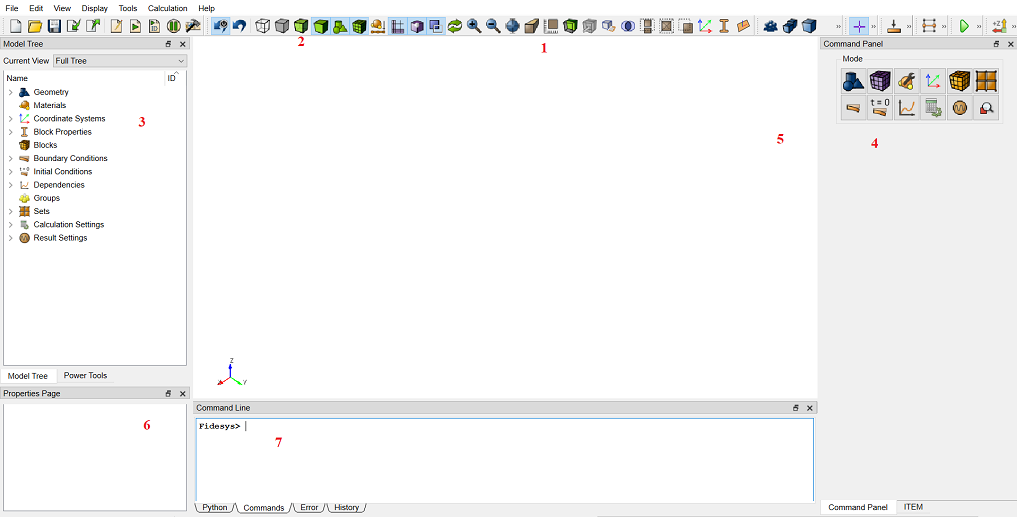
Workbench (1) displays the model and visual effects.
Main Menu (2) includes standard operations for working with files and projects, managing the visualization modes, panel display settings, help, and other functionality available in the drop-down lists of the menu.
Power Tools (3) comprise the Model Tree, as well as the tools for geometry and mesh analysis.
Command Panel (4) contains most of commands for working with the program. Panel display buttons are logically located, and it allows the user to perform the full cycle of calculations step-by-step.
Toolbar (5) comprises the buttons for calling the most frequently used commands while working with the program.
Properties Page (6) displays the properties of the selected object in the Workbench or in the Model Tree.
Console (7) helps you to input the CAE Fidesys commands and to display the messages to the user.