Skip to article


Sculpt GUI

Sculpt can be run from a terminal or a GUI. Sculpt parameters are divided into 4 areas: Size, Mesh, Smoothing, and Parallel.
Size Parameters

Parameter Details

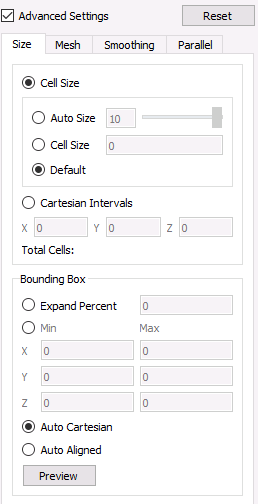
  • Cell Size. Manage the target edge size of the base Cartesian grid by selecting either Cell Size or Cartesian Intervals. Selecting Cell Size will result in three options:

    • Auto Size. Range is [nearly] 0 to 10. Move the slider and see the estimated Total Cells value change.

    • Cell Size. Input a specific target cell size.

    • Default. The algorithm will select a target cell size based on the model parameters.

  • Cartesian Intervals. This defines the number of intervals in the x, y, and z direction of the base Cartesian grid used for defining the volume fraction definition and meshing. The Total Cells value is updated as the x, y, and z values change.

  • Bounding Box. This defines the bounding box or range of the Cartesian grid used for meshing. Three options are available:

    • Expand Percent. Expand the bounding box by a constant percentage value.

    • Min/Max. Change the minimum and maximum extent of the bounding box in 3 directions.

    • Auto Cartesian. The algorithm will define the bounding box.

    • Auto Aligned. Orient the Cartesian grid with the main dimensions of the model.

Mesh Parameters

Parameter Details

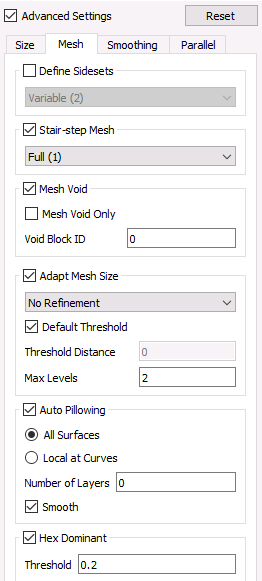
  • Define Sidesets. Selecting this will result in four options for defining sidesets:

  • Fixed. Exactly 3 sidesets will be generated.

    • Sideset 1 - All sides at the domain boundary

    • Sideset 2 - All sides at the model boundary

    • Sideset 3 - All sides at material interfaces.

    • Variable. A variable number of sidesets will be generated, including:

      • Surfaces at the domain boundary

      • Exterior material surfaces

      • Interfaces between materials

    • Geometric Surfaces. If present in the STL file, one sideset will be generated for each surface designation.

    • Geometric Sidesets. Useful when Bolt has identified specific surfaces as sidesets.

  • Stair-step Mesh. No projection and smoothing of material interfaces will occur. Read details here.

  • Mesh Void. Select this to mesh the void of the bounding box as a separate material and indicate the ID of the block to use.

  • Adaptive Mesh Size. Select to include adaptive refinement.

  • Threshold Distance. Read details here.

  • Max Levels. Read details here.

  • Auto Pillowing. Select to add additional layers of hexes at surfaces to improve element quality near curve interfaces.

  • All Surfaces. Hexes with faces on surfaces will be pillowed

  • Local at Curves. Hexes with 3 or more nodes on a curve will be pillowed

  • Number of Layers. Indicate the number of pillow layers to add.

  • Smooth. Select to smooth following pillowing.

  • Hex Dominant. Generate tets in place of poor quality elements.

  • Threshold. Scaled Jacobian threshold value below which tets will be generated.

Smoothing Parameters

Parameter Details

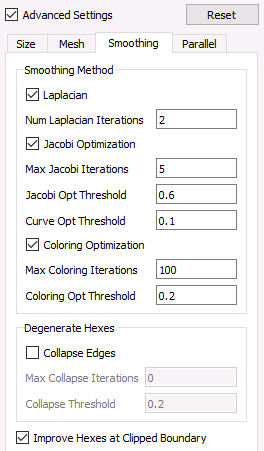
  • Laplacian. Select for Laplacian smoothing.

  • Num Laplacian Iterations. Default value is 2 for Laplacian smoothing iterations.

  • Jacobi Optimization. Select for Jacobi Optimization smooth. If selected with Laplacian, a hybrid smoothing operation will be performed.

  • Max Jacobi Iterations. Default value is 5 for the maximum smoothing iterations.

  • Jacobi Opt Threshold. Default is 0.6 when deciding which elements will be smoothed. All cells with Scaled Jacobian value less than this threshold, plus those cells neighbors, will be smoothed.

  • Coloring Optimization. Select for spot smoothing of isolated nodes.

  • Max Coloring Iterations. Default is 100 for the maximum number of spot smoothing iterations.

  • Coloring Opt Threshold. Default is 0.2 for the Scaled Jacobian spot smoothing threshold.

  • Degenerate Hexes: Collapse Edges. If selected the algorithm will produce degenerate hexes by collapsing edges.

  • Max Collapse Iterations. Default is 10 to determine the maximum number of edge collapse iterations.

  • Collapse Threshold. Default is 0.2 for Scaled Jacobian threshold for collapsed edges. Nodes at hexes below this value are candidates for edge collapses.

  • Improve Hexes at Clipped Boundary. If selected, boundary buffer layer improvement is performed at surfaces intersecting the domain boundary. Otherwise, no boundary buffer improvement is performed.

Parallel Parameters

Parameter Details

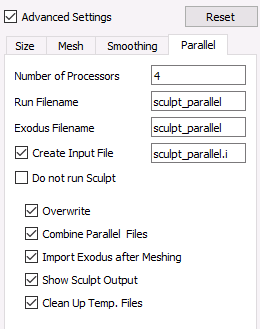
  • Number of Processors. The field defaults to 4. The algorithm is massively parallel and will use as many processors as specified and available.

  • Run Filename.

  • Exodus Filename.

  • Create Input File. This is used to create a file that can be fed into the stand-alone Sculpt executable.

  • Do not run Sculpt. Check this to create the input files only but do not launch Sculpt.

  • Overwrite Existing Files. This is on by default. All existing files with the same name will be overwritten.

  • Combine Parallel Files. This is on by default. The algorithm produces separate results files for each processor. This option will combine the separate files into one results file.

  • Import Exodus after Meshing. Import the completed exodus mesh upon completion of meshing.

  • Show Sculpt Output. This is on by default. Output from the mesher will be displayed in the Output Console window.

  • Clean Up Temporary Files. This is on by default. The algorithm creates a number of temporary files which will be deleted at the conclusion of the meshing process.