Search the documentation
Enter at least 2 characters
Enter at least 2 characters
 |
CAE Fidesys 9.0 Documentation |
In CAE Fidesys, there is a possibility of merging nodes, below we will consider three splice options.
The first option, if the surfaces lie side by side and the grid on them is conformal (neighboring nodes lie, roughly speaking, on top of each other), then it is enough to merge these surfaces (or volumes with these surfaces) to splice the grid.
reset
brick x 2 y 1 z 1
webcut volume 1 with plane xplane offset 0
volume all size auto factor 7
mesh volume all
imprint volume 1 2
merge volume 1 2
The second option involves splicing nodes on free meshes-not tied to geometry. On the command panel, select Entity – Node, Action – Equivalence Nodes and set the interval of node IDs.
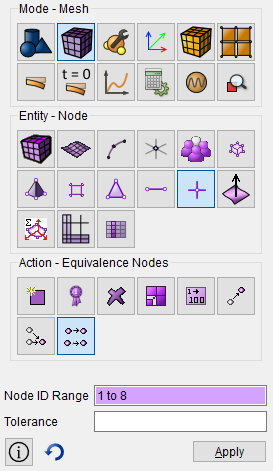
reset
create node location 0 0 0
create node location 1 0 0
create node location 1 1 0
create node location 0 1 0
create face node 1 2 3 4
create node location 0 0 0
create node location 1 0 0
create node location 1 1 0
create node location 0 1 0
create face node 5 6 7 8
equivalence node 1 to 8
There is also a 3 option - forced splice of nodes, when it does not matter whether they are tied to geometry or not (requires activation of the advanced user mode via the console command 'set dev on'). On the command panel, select Entity – Node, Action – Mege Node and set the node IDs.
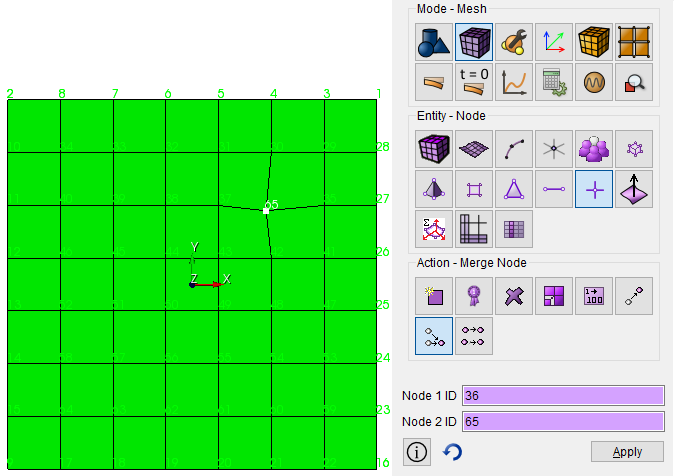
create surface rectangle width 1 zplane
surface 1 size auto factor 6
mesh surface 1
create node location 0.2 0.2 0
set dev on
merge node 36 65
Also, option 3 can be automated with a python script that will run through all (or selected) nodes of the model and splice them if they lie in a certain neighborhood.
Building a model:
reset
brick x 2 y 1 z 1
webcut volume 1 with plane xplane offset 0
volume all size auto factor 7
mesh volume all
Run this script (in the attachment to the letter) from the journal editor in Python mode:
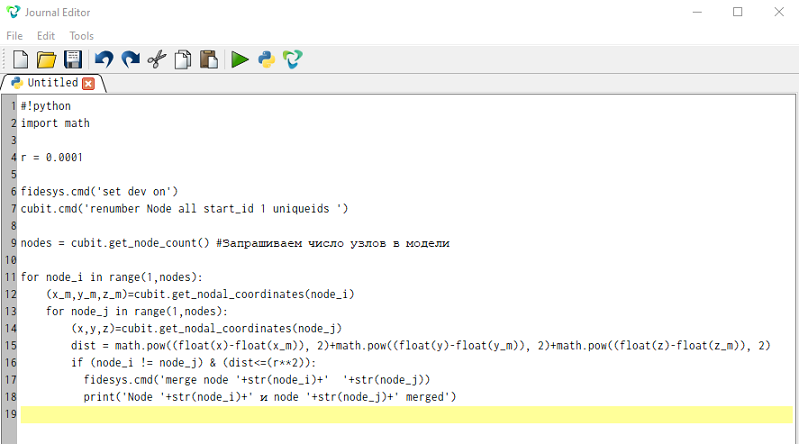
#!python
import math
r = 0.0001
fidesys.cmd('set dev on')
cubit.cmd('renumber Node all start_id 1 uniqueids ')
nodes = cubit.get_node_count()
for node_i in range(1,nodes):
    (x_m,y_m,z_m)=cubit.get_nodal_coordinates(node_i)
    for node_j in range(1,nodes):
        (x,y,z)=cubit.get_nodal_coordinates(node_j)
        dist = math.pow((float(x)-float(x_m)), 2)+math.pow((float(y)-float(y_m)), 2)+math.pow((float(z)-float(z_m)), 2)
        if (node_i != node_j) & (dist<=(r**2)):
          fidesys.cmd('merge node '+str(node_i)+'  '+str(node_j))
          print('Node '+str(node_i)+' и node '+str(node_j)+' merged')
Nodes will be spliced forcibly. If necessary, you can splice nodes of only selected surfaces or nodeset.