Search the documentation
Enter at least 2 characters
Enter at least 2 characters
 |
CAE Fidesys 9.0 Documentation |
The align Operation is a combination of the rotate and move Operations. The align Operation will align the surface of a given volume with any other surface in the model, such that the surface centroids are coincident and the normals are pointing either in the same or opposite direction (depending on their initial alignment). The align Operation can also align a face of a volume with the xy, yz, and xz planes and the vertices of a volume with the x, y, and z axes.
To use the Align Operation.
On the Command Panel, click on Geometry and then Volume.
Click on the Transform action button.
Select Align from the drop-down menu.
Enter the appropriate values for Volume ID(s), Surface ID and With Surface ID. This can also be done using the Pick Widget function.
Click Apply.
Align Volume <id_range> Surface <surface_id> with Surface <surface_id>
[reverse][include_merged][preview]
Align Volume <id_range> {Surface <surface_id>| Vertex <vertex_id>} {{X|Y|Z Axis}|{XY|XZ|YZ plane}}
[reverse][include_merged][preview]
Align Volume <id_range> Location {options} with Location {options} about Axis {options} [include_merged][preview]
The first align command above will transform the specified volumes by computing a transformation that would align the first surface with the second surface such that the surface centroids are coincident and the normals are pointing either in the same or opposite direction (depending on their initial alignment). The first surface need not be in the specified volumes.
The second form of the align command either aligns a face of a volume or two vertices (forming a direction) with the xy, yz, and xz planes or the x, y, and z axes. If the [reverse] option is specified, the resulting alignment is flipped 180 degrees.
The third form of the command is a rotational alignment, where the specified entities are rotated about the specified axis, where the angle of rotation is the angle between the first and second locations with respect to the axis.
This transformation is useful for aligning surfaces in preparation for geometry decomposition and aligning models for axis-symmetric analysis. If the [include_merged] option is used, all entities that are merged with the specified volume will be included in the align transformation also.
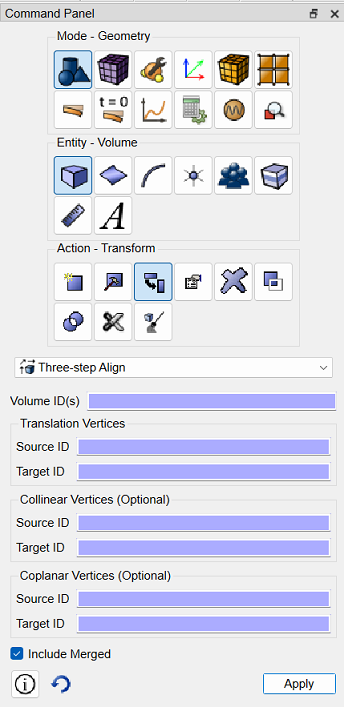
Beginning with CAE Fidesys, the command panel Three-step Align is included in the GUI. This new functionality is accessed via the command panel user interface in CAE Fidesys and via the command panel and the command line in subsequent versions of CAE Fidesys.
 |
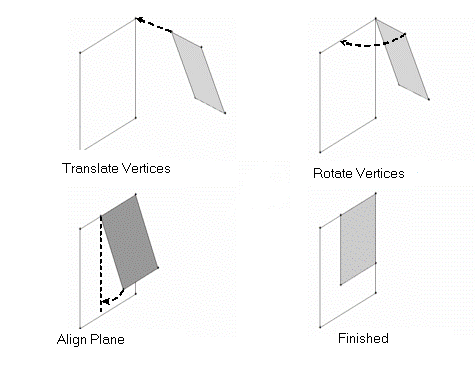 This functionality is available for volumes, surfaces, curves, and vertices.
|
{body|volume|surface|curve|vertex|group| <id_range> align using vertex <source_id> <target_id> [collinear vertex <source_id> <target_id> [coplanar vertex <source_id> <target_id>]] [include_merged]
In this command, the specified entities to align will be moved such that the source vertices are aligned with the target vertices. If the target vertices happen to be moved as a result of the alignment, the source vertices are moved such that they align with the original coordinates of the target vertices.
After the alignment, the first vertex pair will be coincident, the collinear vertex pair will be collinear, and the third vertex pair will be coplanar.