Search the documentation
Enter at least 2 characters
Enter at least 2 characters
 |
CAE Fidesys 9.0 Documentation |
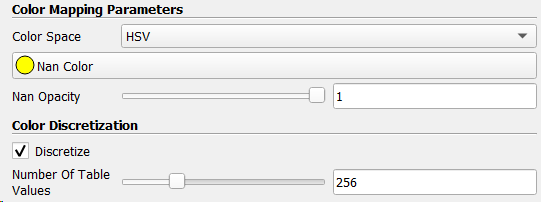
Figure 5. Color matching options, including additional properties. Additional properties are activated by clicking on the gear icon in the upper right corner of the color editor cards (not shown)
The Color Map Options property group provides additional control over the color rendering function, including space management color interpolation, which can be RGB, HSV, Lab, Divergence, Pitch, or Lab/CIEDE2000. You can choose different colors for the data falling on both sides of the spectrum. When color matching, an array of floating numbers with a NaN comma you can select the color and opacity to be used for NaN values. You can also influence whether the function uses color transfer smooth interpolation or digitizes the map to a fixed number of flowers.