Search the documentation
Enter at least 2 characters
Enter at least 2 characters
 |
CAE Fidesys 9.0 Documentation |
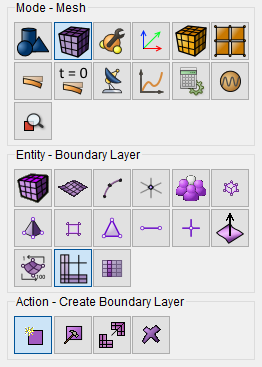
Beginning with CAE Fidesys adds boundary layer meshing for CFD to the list of supported features. Boundary layer meshing is best accessed via the GUI.
To create a boundary layer:
Figure 1 shows the Settings panel.
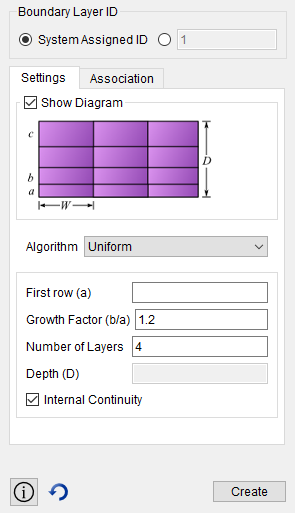
First row(a) -- the height of the first layer in the boundary layer
Growth Factor(b/a) -- the factor by which each layer grows
Number of Layers -- the number of layers that make up a boundary layer
Internal Continuity -- continuity flag for boundary layers. If on, all intersections are a side type.
For 2D boundary layers:
For 3D boundary layers:
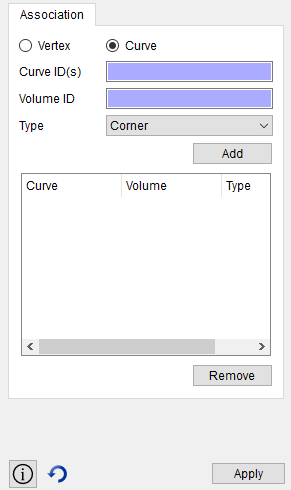
Figure 2 shows the Association panel.
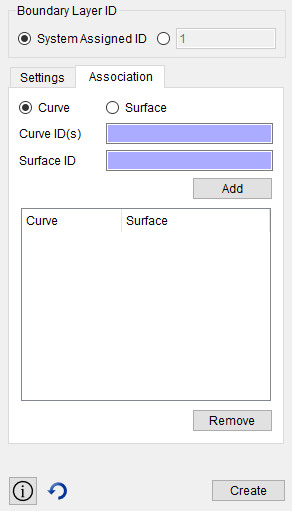
For 2d boundary layers, a curve/surface pair is given to create a boundary layer starting from a curve and growing out on the given surface.
For 3d boundary layers, a surface/volume pair is given to create a boundary layer starting from a surface and growing out on the given volume.
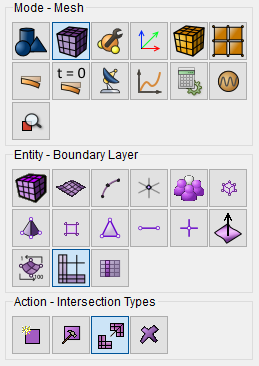
In some cases, the user may want to adjust the intersection types. This could be because the automatic intersection type is not desired, or because it is not workable due to ambiguity.
The four intersection types are:
These intersection types may be set on a vertex/surface basis and on a curve/volume basis.
Figure 3 shows the Intersections Types panel.
Not all combinations of intersection types and topology are supported for 3d cases. An end, corner, or reversal may not span multiple curves in a single volume. A possible workaround is to composite the curves to make a single curve.
Not all meshing schemes may be used in combination with boundary layers. In cases where it is not supported, the boundary layer will be ignored in mesh generation. It is supported with the following schemes:
Create Boundary_layer <id>
Delete Boundary_layer <id>
Modify Boundary_layer <id> add Curve <id_range> Surface <id>
Modify Boundary_layer <id> remove Curve <id_range> Surface <id>
Modify Boundary_layer <id> add Surface <id_range> Volume <id>
Modify Boundary_layer <id> remove Surface <id_range> Volume <id>
"*** Only three of the four parameters should be specified ***
"*** (Height, Growth, Layer, or Depth) ***
Modify Boundary_layer <id> uniform Height <double> Growth <double> Layers <double> Depth <double>
Modify Boundary_layer <id> continuity {yes | no}
set boundary_layer intersection volume <id> curve <ids> type {end, side, corner, reversal, default}
set boundary_layer intersection surface <id> vertex <ids> type {end, side, corner, reversal, default}
reset
create surface rectangle width 10 height 3
create surface circle radius 5 zplane
surf 2 move z -10
create volume loft surface 1 2
delete surf 1 2
create boundary_layer 1
modify boundary_layer 1 uniform height 0.1 growth 1.2 layers 4
modify boundary_layer 1 add surface 4 volume 3 surface 5 volume 3 surface 6 volume 3 surface 7 volume 3
set boundary_layer intersection volume 3 curve 10 type side
set boundary_layer intersection volume 3 curve 12 type side
set boundary_layer intersection volume 3 curve 14 type side
set boundary_layer intersection volume 3 curve 16 type side
mesh vol 3
reset
create surf rectangle wid 2
cylinder rad .1 z .1
cylinder rad .02 z .1
section volume 2 xplane reverse
section volume 3 xplane
volume 3 move x .5
create volume loft surface 12 8
unite volume 2 3 4
vol 2 copy
vol 5 scale .3 .3 1
vol 5 rotate -10 about z
vol 5 move x .55 y -.1
vol 2 5 move x -.25
imprint all
delete vol 2 5
surf all scheme trimesh
group 'profile' add curve 69 67 68 70 71 72 73 74
create boundary_layer 1
modify boundary_layer 1 uniform height 0.002 growth 1.2 layers 6
modify boundary_layer 1 add curve in group with name 'profile' surface 36
curve in group with name 'profile' size 0.02
surf 36 size .3
surface 36 sizing function linear neighbor 2
mesh surf 36